
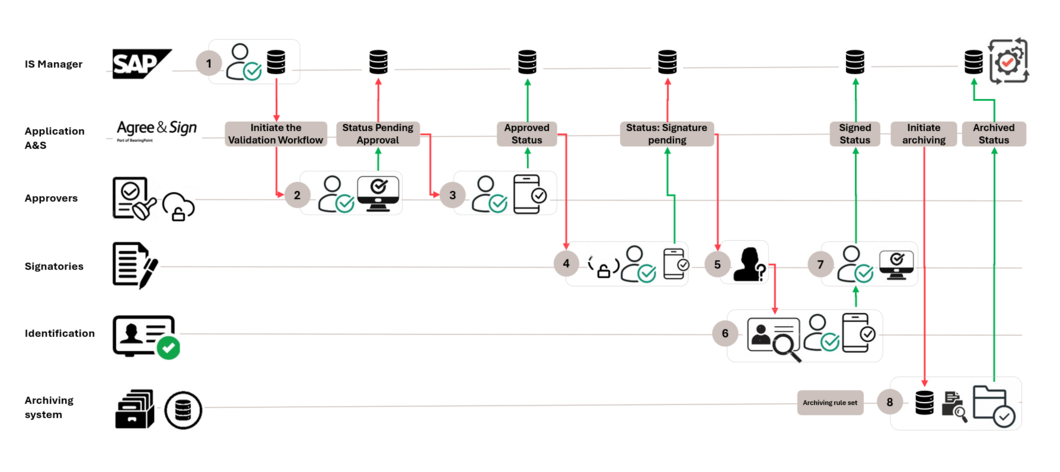
The ENTERPRISE workflow for purchase agreements was developed to standardize and optimize the review, approval, signing, and archiving of purchase agreements within an organization. By integrating SAP with Agree&Sign, the entire lifecycle—from initiation to secure archiving—runs through a fully digital, traceable, and compliant process. This ensures faster processing times, greater transparency for stakeholders, and a significantly reduced administrative workload. Each step includes clear tasks, automated notifications, and verifiable actions, making the workflow efficient and compliant.

Request your demo now

Solution with Agree&Sign – Step by step

Contract is triggered in SAP

A purchase agreement is created in SAP and automatically sent to Agree&Sign, where the approval workflow begins. The contract immediately changes to "Pending Approval" status, and all designated approvers are notified that the document is ready for review.

1

Start of the validation workflow in Agree&Sign

Approvers log in to Agree&Sign to review the content of the contract. They can then either approve or reject the document. Once a document has been approved, the system updates the workflow status to "Approved," ensuring that every validation step is fully logged and transparent.

2

Final approval review

If multiple approval levels are required, Agree&Sign guides each approver through the contract review process. The approvers evaluate the document and confirm their decision. Once final approval has been granted, the workflow remains in "Approved" status and the next phase is triggered.

3

Transfer to signatories

Once approved, Agree&Sign automatically notifies the signatories assigned to the contract. The contract then changes to "Signature pending" status. The signatories then authenticate their identity using the required verification method and prepare to sign the document.

4

Contract signing

Signatories can use Agree&Sign to sign the contract electronically. This process includes validated identification steps such as KYC or eID to ensure compliance with legal requirements. Once all required signatures are in place, the status of the workflow is updated to "Signed."

5

Preparation for archiving

Once the document is fully signed, Agree&Sign starts the archiving process. The contract is bundled together with its complete audit trail for long-term storage. This signals that the document is ready for secure transfer and has reached the "Archive" phase of the workflow.

6

Transfer to the archiving system

Agree&Sign then transfers the signed and validated contract to the connected archiving system. Upon receipt, the archiving system confirms that the document has been successfully captured and will be stored in accordance with the company's retention standards.

7

Archiving confirmation

The archiving system confirms that the document has been securely stored. As soon as Agree&Sign receives this confirmation, the workflow is updated to the final status "Archived." If SAP integration is activated, the status can also be updated in SAP for reconciliation or auditing purposes.

8
Sven Gerhardus

Contact - Name:

Sven Gerhardus
Chief Executive Officer

Any further questions? Contact our expert:

We use reCaptcha to secure our forms. This requires JavaScript enabled.

This submission has been blocked due to detected suspicious activity or security concerns. If you believe this is an error, please try again later or contact support for assistance.

Complete all fields marked with an asterisk

Digitize all your approval and contract processes – fast, easy, and secure!

Get in touch with our team! Our experts will be happy to answer all your questions in detail.